|
Exciting news! SynthEyes has joined Boris FX and its award-winning VFX product family. Find out what this means for you. |
What is SynthEyes?
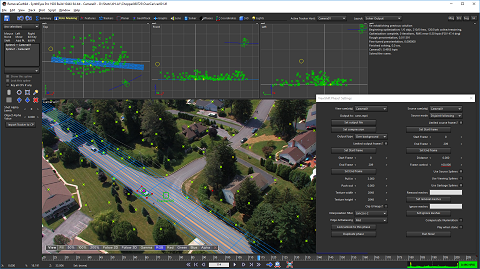
SynthEyes is a program for 3-D camera tracking, also known as match-moving. SynthEyes can look at the image sequence from your live-action shoot and determine how the real camera moved during the shoot, what the camera's field of view (~focal length) was, and where various locations were in 3-D, so that you can create computer-generated imagery that exactly fits into the shot. You can also track objects that are moving in the scene, which is known as object tracking or geometry tracking, to find out where they moved (or are located) in the 3-D environment. SynthEyes is used world-wide in film, television, commercial, and music video post-production.
What can SynthEyes help me do? You can use SynthEyes to help insert animated creatures or vehicles; stabilize shaky conventional or 360°VR shots; extend or fix a set; add virtual sets to green-screen shoots; replace signs or insert monitor images; remove unwanted objects from shots; produce 360° virtual reality or 3D stereoscopic films; create architectural previews; reconstruct accidents or crashes; do product placements after the shoot; move imagery from one shot to another; add 3D cybernetic implants, cosmetic effects, or injuries to actors; produce panoramic backdrops or clean plates; build textured 3-D meshes from images; add 3-D particle effects; or capture body motion to drive computer-generated characters. And those are just the more common uses; we're sure you can think of more.
What are its features? How much time do you have? For a longer list, see the Features tile below. Here's a few to start. SynthEyes offers 3-D tracking, set reconstruction, stabilization, and motion capture. It handles camera tracking, 2- and 3-D planar tracking, object tracking with or without a reference mesh, geometry tracking, geometric hierarchy tracking, secondary tracking, camera+object tracking, survey shots, multiple-shot tracking, tripod (nodal, 2.5-D) tracking, mixed tripod and translating shots, stereoscopic shots, nodal stereoscopic shots, zooming shots, 360° VR shots, lens distortion, light solving. A keyer simplifies and speeds tracking for green-screen shots. The image preprocessor helps remove grain, compression artifacts, off-centering, or varying lighting and improve low-contrast shots, or convert to and from 360° VR shots. Meshes can be built from tracking data, and their textures extracted from the image sequence, producing higher resolution and lower noise than any individual image. A revolutionary Instructible Assistant, Synthia™, helps you work faster and better, from typed or even spoken natural language directions.
SynthEyes offers complete control over the tracking process for challenging shots, including an efficient workflow for supervised trackers, combined automated/supervised tracking, offset tracking, incremental solving, rolling-shutter compensation, a hard and soft path locking system, distance constraints for low-perspective shots, and cross-camera constraints for stereo. A solver phase system lets you set up complex solving strategies with a visual node-based approach (not in Intro version). You can set up a coordinate system with tracker constraints, camera constraints, an automated ground-plane-finding tool, by aligning to a mesh, a line-based single-frame alignment system, manually, or with some cool phase techniques. The ViewShift system allows you to do object removals, combine split takes, generate animated texture maps, and more.
Eyes starting to glaze over at all the features? Don't worry, there's a big green AUTO button too. Download the free demo and see for yourself.
What can SynthEyes talk to? SynthEyes is a tracking app; you'll use the other apps you already know to generate the pretty pictures. SynthEyes exports to about 25 different 2-D and 3-D programs. The Sizzle scripting language lets you customize the standard exports, or add your own imports, exports, or tools. You can customize toolbars, color scheme, keyboard mapping, and viewport configurations too. Advanced customers can use the SyPy Python API/SDK.
Features
SynthEyes has an amazing feature list encompassing a wide variety of shot types, tracking methods, solving features, exports, etc.
Linux
You can run SynthEyes on many Linux distributions that are popular in VFX shops (in addition to Windows and macOS).
New 2024.1 Highlights
- New “Advanced Lens Distortion” plugin for After Effects supports all SynthEyes lens models.
- Plugins support Apple Silicon, ie M1/M2/M3 machines.
- AE Exporter supports animated distortion, off-center lenses, and non-square pixels.
- 3D Mesh export direct to AE Beta using OBJ files.
SynthEyes On Screen
Some projects that used SynthEyes:
- No Hard Feelings
- Plane
- The Terminal List
- Foundation
- Greyhound
- Birds of Prey
- Raised by Wolves
(People don't let us know any longer, so this list is well out of date. Feel free to help change that. 😉)
Tell Me More About...
Click here for access to more information about diverse topics including
- 360VR Stabilization,
- Geometric Hierarchy Tracking,
- 360VR Stereo,
- Synthia,
- Python,
- Facial and motion capture,
- Developing new exporters, ...
SynthEyes easily is the best camera match mover and object tracker out there.
Matthew Merkovich